Visual Sitemap Creation & Updating
The visual sitemap is a project scopes best friend. It paints a easy to understand 30k-ft view of how large or small a website is. It also shows clients where a specific page is at during the course of the project, and what pieces may be dragging out due to unforeseen complications. It also shows a scope of how much work our design team is tasked with.

What is a ‘Gliffy’?
LOL, that is the name of the tool we use to put together the sitemaps. Once you log into the site (the password is in 1pass), you will have the opportunity to open saved sitemap files. Best place to start to learn this procedure is to open the site map template.
What are all the squares? What do all of the colors mean?
 Each square on the sitemap represents a page on the website. The color tells the viewer where that particular page is at in the production of the project. Is this page still undergoing a design process? Waiting on content? Or is it approved and ready to be reviewed by a client.
Sitemaps are updated through the coarse of each phase of the web project development process. It is not uncommon to have some pages hung up in phases previously thought complete. But in the interest of speed, and the management of client expectations, we don’t want to hold up timelines for those 1 or 2 pages we are still waiting for certain approvals on.
What do the Icons mean?
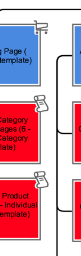 The icons do not have significant meaning, other than to quickly flag a developer to know that there is a bit more special programing on this page besides just displaying some content and pictures. We offer a key in the sitemap template to help guide which icons to use, and when it may be appropriate to use them.
Anatomy of each Block/Page
Each block should contain various pieces of data. While it sounds complicated, in practice it is pretty simple. Simply enter the title of the page, and in parenthesis write in what page design template this page should use.
Next simply color code appropriately. If this page is being planned out at the beginning of the project, the page will likely remain white in color as the client has yet to approve they in fact want that page to exist on the site. After all, each page created on a website, requires a certain amount of content to be written.
Template List Key
The sitemap and instagantt chart are the most common status update documents ideally sent to communicate the status of a web project build. This is both for internal communication and external. It keeps things easily scannable to see exactly how many page templates need to be designed and developed. Keep this list up to date as pages are created in the map.