Shindoshi and its Use
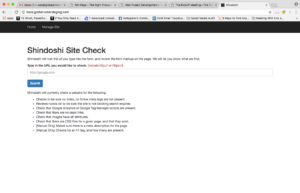 Like a member of the Bujinkan martial arts organization in Japan, Shindoshi is as stealthy of a micro site as it sounds like. Shindoshi does not require a client or prospective client to be a part of the Globe Runner family just yet. It can be any URL you want to type in and anaylze.
To access Shindoshi, simply go to http://tools.globerunnerstaging.com.
What does Shindoshi do exactly?
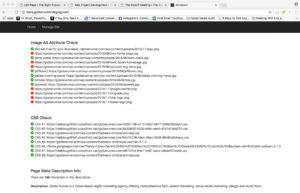 Shindoshi performs various types of on-site checks. Shindoshi will try to find everything wrong that it can, and make recommendations to resolve the issue. If it sees something very bad, it will red flag it and make you aware of it. This can also be used as another quality assurance measure.
What is the point of this tool?
Shindoshi is geared up to make things successful. When we are getting ready to launch a website, that would be the perfect time to run a site through Shindoshi. We don’t launch a site with red flags, and that’s exactly where Shindoshi comes in. When the tool does not return any errors, we can consider the procedure complete.
At its highest level, its there to help with a couple of things. It helps us with our quality assurance. It also helps in the case that something eventually breaks. Potentially, this can also be used as a sales tool. We can use it to see what people need help with on their websites.
Can you walk me through the Procedure Step By Step?
The procedure itself takes approximately 5 minutes from start to finish, not including the time it takes to resolve the errors it reports (if any).
There are 2 phases of this procedure. The first set, it to run the tests, and simply get a passable results. The second, is to add the website to the automated shindoshi sight check.
The first phase walk through
- Go to http://tools.globerunnerstaging.com, and review the notes displayed on screen.
- When you are ready to run a site check, enter the url into the input box on screen.
- It is important to note that you are required to enter http:// or https://. If you don’t, shindoshi will only report a server error.
- Allow shindoshi a couple of of seconds (or minutes) to completely evaluate a website. It will return the results of its checks.
- If required, resolve all complaints that Shindoshi responds with. You may need to reach out to different team-members to complete them to proceed.
- Once a site check can be ran, without any red flags issued from Shindoshi, this phase is complete.
How do I complete the second phase?
- Go to http://tools.globerunnerstaging.com, and review the notes displayed on screen.
- In the main navigation, there is a button called “Manage Site“. Click it. This will land you on the Shindoshi automation page, review the notes displayed on screen.
- Similar to the last phase, you will need to enter the domain, and click submit.
- It is important to note that you are required to enter http:// or https://. If you don’t, shindoshi will only report a server error.
- This phase is now complete. Automated Shindoshi will now monitor the site twice a day for any potential errors, and e-mail the appropriate team members if it eventually finds something wrong.